首先要"自吹"一把,我有经验。我非常懂古法编程。从2004年成为专职程序员,我对如何产出高质量的代码烂熟于心。我开发的my-ai-team只是把这些经验应用到干活的agent身上,让他们能够自动化且同样高质量地完成任务。
我没有pro订阅。就是有,我也不会让fable/asta 去做delivery agent。好钢要用到刀刃上。我确实有fable可以用。公司提供给我的claude可以用Fable。但我仅用它来诊断架构层面的缺陷,或者让它找出当前系统里最值得改进的n个点来开票,一般是在7d reset临近,但我额度剩余还比较多的时候。
真正的delivery agent我用 gpt-5.6-luna,effort level我甚至不用开到max, xhigh已经很够用了。“你在吹牛B吧”,真不是。因为我的my-ai-team具备化“腐朽”为神奇的超能力。
说人家5.6-luna是“平庸”模型纯粹调侃。人家是便宜,不够卓越,但人家真不是垃圾。发挥稳定,皮实耐用。我两个企业seat(我年付,两个seat月NZ$66)账号,再加上我的z.ai订阅,minimax年订阅,还有freebuff的免费token加持,我的my-ai-team基本上能做到一周7天24小时干活不缺token。我可不是开一个两个agent,同时十几个agent干活是常态。看看这是我一台机器上的agent。我有n台机器都在跑my-ai-team。但这台是最heavy的。一台2020年老xps,32G内存。上面还跑一着一个windows虚拟机和一个github runner。
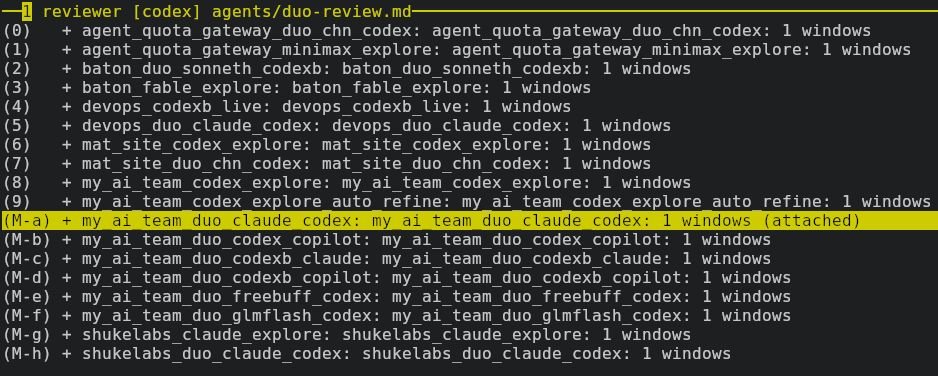
接下来我要分享的是干货。平庸模型如何稳定产出优质代码?
TLDR; 非要一句话来说的话,那就是我,或者说我开发的my-ai-team,从源头上保证了质量。
在my-ai-team里, delivery agent面对的不是一个个模糊的需求,“帮我修这个bug”,“帮我实现这个”。你不能要求这种输入给你好的结果,一击而中?就是中了你也不知道是如何中的,后面又如何维护?
大家Vibe 知道prompt的重要性,你的prompt越含糊,AI的发挥余地越大,输出结果就越不可控,更有可能烧了token却收获一肚子气。其实人与人交流又何尝不是如此呢?做为程序员,都愿意做需求描述一清二楚,验收条款明明白的票。Agent也是如此。
在my-ai-team里,你最重要的工作就是和 explorer agent“聊天”(输入),而explorer负责澄清你含糊的要求,确认当前的代码基础,找到真正可行的解决方案或者bug根因,最后输出一张或多张高质量的票。这些票是delivery agent的输入。这一步高质量地完成了,delivery agent只是按图索骥,因此不需要那么牛的模型。其实我大部分票也是和luna,glm5.3聊出来的。这引出了另一件重要的的输入,宪法 -- 也就是系统prompt。为什么explorer能写出好票,我和普通的claude,codex聊不也一样吗?不一样。因为普通的cluade/codex的内置system prompt为适应各种各样的任务,只能设置一些很常规很普遍的要求。术业有专攻,如果我们希望这个agent能开好票,那就要在宪法里提要求,并配合必要的hooks来确保这个agent遵守了这些要求。
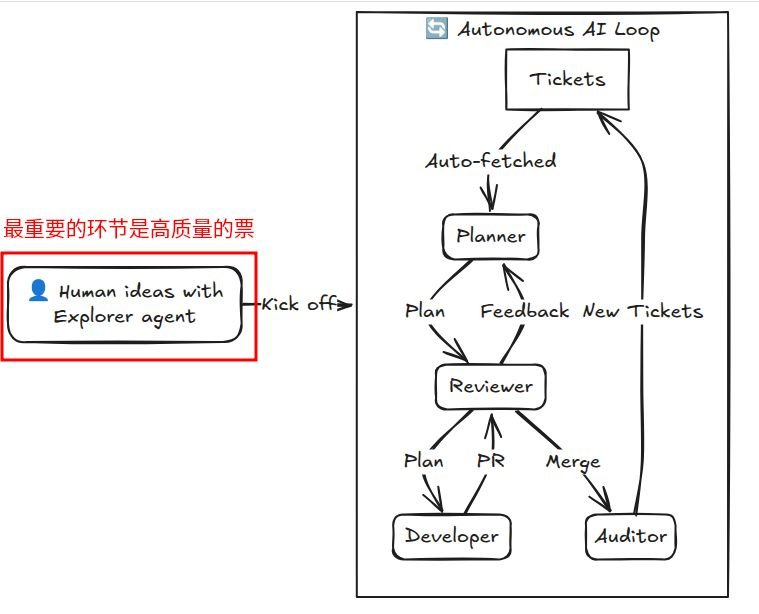
delivery agent拿到票的第一步,是做计划。票已经很高的质量,计划做起来就会容易,但容易的事情并不总是容易做好。agent也会有遗漏,也会有误判。这时独立Reviewer的价值就出来了。
计划是实现的输入,计划的质量决定实现的质量。让做计划的人自己审核计划,不是不行。这跟让球员同时当裁判的效果差不多。独立Reviewer拿一本确保自己能做好Review工作的宪法,它总是用挑剔的眼光审查计划。它有自己的检查清单,它有自己独立的判断标准。好,经过几轮碰撞,计划过关了。
现在输入到developer agent来做实现了。实现是PR的输入。Developer有自己的宪法,按照宪法原则照计划行事,不能少做,也不允许擅自扩大范围。但允许顺手修掉自己工作范围的小bug。“勿以善小而不为”是我写到每个agent宪法里的一句话。实现完了,同样有专门的勾子提醒它按照一份清单做自我批评。测试都通过了吗?这次是治表还是治里?开发者自己满意了,这才把建好的PR交到同一个独立Reviewer手里。这个Reviewer的上下文里只有审核通过的计划,接着审核实现再合适不过。即使developer声称测试都通过了,Reviewer也再要独立验证。除了本地测试,还要检查CI是红是绿。发现任何must fix都要打回Developer再来一轮。功能实现正确了,CI也是绿的,Reviewer也没有发现其他必改的缺陷,这时候才是自动合并PR的时机。完了吗?还没有。合并完PR的同时,my-ai-team会自动通知值班的auditor agent。auditor agent负责审查合并的代码,再多一双眼睛检查是否引入了新的缺陷。如果有所发现就会开票。如果缺陷严重,还会主动标priority:high。这些
这就是我用"平庸"模型写出高质量软件的"秘密"。根本没有秘密,只有好的实践。my-ai-team正在促销,首年年费5折,欢迎订阅。 https://mat-docs.shukelabs.com 只要$49.99,my-ai-team就会成为你的ai team。支持claude code, github copilot, codx, pi, opencode, grok, freebuff 以及 command code。一人公司也不必非要忙得昏天黑地,一人公司同样可以拥有高质量的生活。祝大家vibe愉快!写出好的作品,造福全人类。
我后面会分享my-ai-team里explorer的最新版本的宪法以及我们用到的skill给大家。太太喊我吃饭,就先写到这里。
An SSH .pub file is only the public half of a key pair. If it is missing, or if it is an old file that no longer matches the private key, regenerate it from the private key:
cp ~/.ssh/id_rsa.pub ~/.ssh/id_rsa.pub.backup 2>/dev/null || true
ssh-keygen -y -f ~/.ssh/id_rsa > ~/.ssh/id_rsa.pub
chmod 644 ~/.ssh/id_rsa.pub
ssh-keygen -y derives and prints the public key without exposing the private key. This also fixes errors such as:
identity_sign: private key ... contents do not match public
Verify the resulting public-key fingerprint with:
ssh-keygen -lf ~/.ssh/id_rsa.pub
diffwalk's marketed flow is one-shot: your coding agent captures the diff, writes the entire walkthrough, and hands you a rendered review to read. That works for sharing, but when the goal is understanding what the agent just changed, a finished lecture is the wrong shape — you read passively, and the agent's framing never gets challenged.
Two changes made it click for me.
Publish is not part of the loop. diffwalk publish only mints a share link. For your own comprehension, diffwalk view (loopback-only) is already the end of the pipeline — and often you don't need the browser at all:
diffwalk changes            # list captured blocks
diffwalk change change-009  # read one block in the terminal
Interleave instead of pre-authoring. Instead of letting the agent write all of explanations.yaml up front, go one block at a time: the agent explains the block and gives its own take (correctness, risks, simpler alternatives), then stops and waits. I answer with mine. We decide jointly whether the block deserves a GitHub comment — the draft is shown in full and posted only after I confirm the exact text. Then, next block.
The agreed explanation for each block still lands in explanations.yaml as the loop runs, so a final diffwalk check doubles as "did we actually cover every change". The review conversation produces the walkthrough document as a side effect, instead of the document replacing the conversation.
One implementation note: I didn't edit diffwalk's own SKILL.md — it ships through npm and an update would clobber the edit. The pair-review loop lives in a separate custom skill beside it.
我有一个手动发推的 CLI(Playwright 驱动登录状态的 Firefox 网页,所以不需要 X API key),还有一个多用户笔记应用(HappyNotes)把新笔记推入 Redis 队列同步到 Mastodon。想让它俩连起来:笔记一发,自动发推。但不想动共享后端、毕竟这是一个很私人的hack,也没法子支持其他用户。
演进三步
1. CLI → 微服务。 把发推核心抽成库,Node 内置 http 起一个服务,只监听 Tailscale IP(100.x.y.z:8090)——内网即鉴权,零依赖、零鉴权代码。任何 tailnet 机器都能入队:
curl -X POST http://100.x.y.z:8090/add \
  -H 'content-type: application/json' \
  -d '{"text":"hello","post_at":"2026-09-07T09:00:00+12:00"}'
2. 图片走 data URL。 别的机器没有你这台的文件系统,multipart 又要新依赖——所以图片在 JSON body 里以 data:image/png;base64,... 传输,Playwright setInputFiles 喂内存 buffer,最多 4 张。
3. 只读 Redis 旁观者。 这是关键设计:不 LPOP(会偷走 Mastodon 消费者的消息),只每秒 LRANGE queue + ZRANGEBYSCORE processing,用 redis-cli 子进程(还是零新依赖)。然后三道过滤:
userId == OWNER_USER_ID && action == "CREATE" && isPrivate == false
task.id 落盘去重(先写 seen 再发布,失败绝不重试——重试 = 重复推文),冷启动基线首轮只记已见不发布,防止积压刷屏。
代价:一个有意的竞态窗口
队列项最多活 5 秒(消费者 LPOP 后成功后 ZREM,删了就没了,没有 deleted 队列可拣漏)。所以旁观者"几乎不漏但不保证"——如果任务在两次轮询之间被消费完,就错过了。要修复的话要动HappyNotes后端(加一个 synced 队列,成功时 LPUSH + 1 小时 TTL),但只为我一个人需求改全站代码不太值,先接受这个妥协看看。