我的第一个Bounty项目
我大概半月前投标了一个Bounty项目,是JuliaHealth的一个issue,如果最终提交被接受,奖金是US$750。 这个issue有点难,奖金不算低,但加上我只有两个人竞标。
我之前没有写过一行Julia代码。在投票时我也坦承自己没有Julia经验,但做为一个身经百战的老程序员,我想挑战这个问题。更何况,我还有my-ai-team。 当时我就想,体验一下嘛,失败了也没关系,至少还能因此了解Julia语言。
我没指望能被选中,另一个投标者虽然表达兴趣时虽然只写了一小段,但人家多少有Julia经验。 昨天GitHub弹出消息,说恭喜我被选中了,最迟12月8号交活。这下就不得不认真准备了。
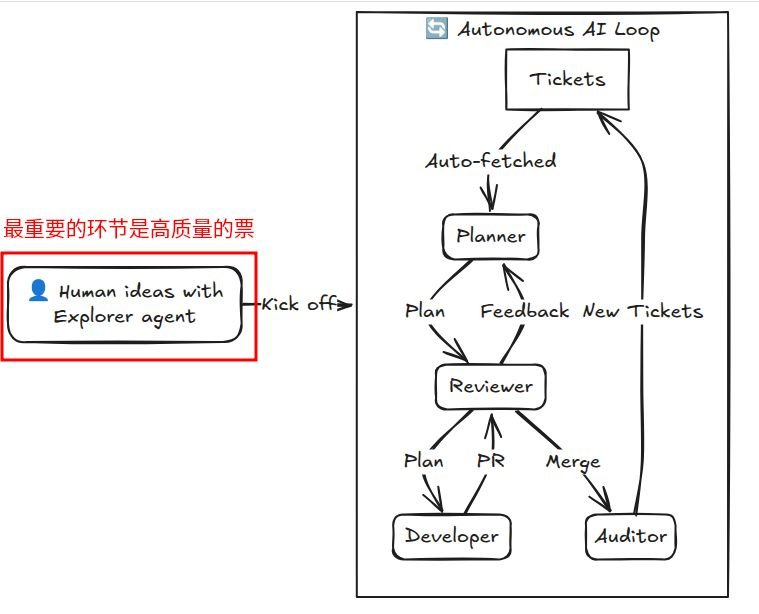
因为这个项目是GPT帮我选的,为了不占用Codex流量,我就让GPT先准备第一张票 侦察一下这个issue有多难。我开了一个新仓库 BountyLab, 准备工作就在这里做。不知道是不是因为GPT不方便调用gh命令,它说票弄好了,其实它只是在仓库写了一个ticket01.md。但我并没有检查,因为我知道GPT并不是专业的开票agent。它的票肯定不规范,所以我就让我的专业开票员 explorer agent给我“refine #1”。这是我给它的唯一的指令。
这次explorer背后的模型,我指定的是deepseek v4 pro。这次refinement它颇花了些时间,因为这个ticket01.md scope其实挺大。虽然BountyLab几乎是空的,但这个票是侦察票,需要了解我中标的issue到底是个什么问题,牵扯哪些仓库的哪些模块,等等等等。它做了很仔细的调研之后,把这票整理的很规范之后,标上了Ready。这当中令我印象深刻的是,它没有找到#1之后并没有停下来问我,而是翻仓库找到了ticket01.md然后以此为原始需求,精炼之后新建了真正的#1。
我让GPT评价这次精炼,它仔细读了票之后说:
你只给了它一句 “refine #1”,而当时仓库里并没有 GitHub Issue #1,只有我留下的 Markdown ticket 和 JuliaHealth workspace。它没有卡在“找不到 #1”,也没有凭空乱造,而是先调查 repo 现有结构、读出我们的意图,再把 Markdown ticket 提升成正式的 GitHub Issue #1。这说明它做了三步很关键的推理:
先识别“#1”大概率指的是已有的第一张 ticket;再从 repo 内容恢复上下文;最后把它重构成更适合 agent 执行和验收的 issue。
这比单纯“润色文字”强很多。尤其它还自己补出了 pinned SHAs、具体 deliverable、acceptance criteria、upstream read-only 边界,这些都不是你那句话直接要求的。
我的评价是9.5/10。剩下那 0.5 不是能力问题,而是工程上我还是会对它加的那两个验收条件做一点去脆弱化,避免 ticket 自己太聪明、反而约束过头。
这其实也挺能说明 my-ai-team 的价值:人给的是意图,agent 负责把意图变成可执行工作单元。 它确实做到了。(我背后偷笑:这当然是我给开票员制定的优秀宪法的功劳)
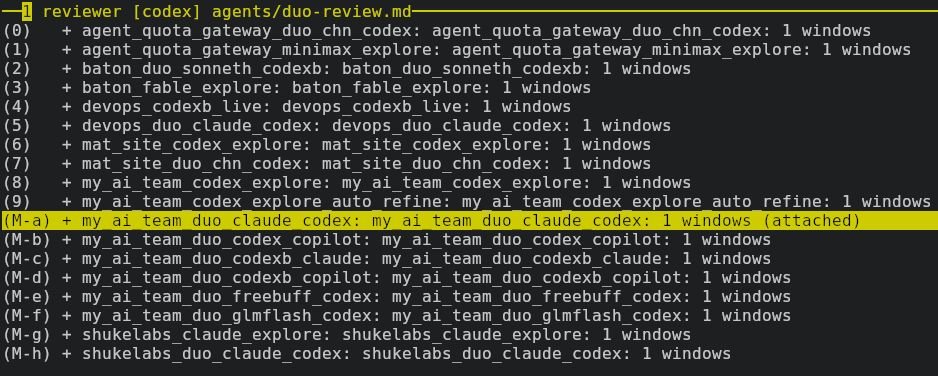
票Ready了,早已等候多时的delivery agent立即就pickup了票开始施工。这次我用得Planner/Developer是GLM5.3Flash high,而Reviewer是GPT-5.6-Luna xhigh。从15:33分开始接到单,到最后17:29合并。两个agent忙活了两个小时,Reviewer打回去十次,最后批准了第十一版,合并了PR。我拿到了报告。
然后我让GPT评价这份报告,ta的评价是:(警告!!!会看到许多“不是,而是”的GPT腔,我一字未改哦!)
这次我会给 delivery agent + reviewer 这一对组合打 10/10。
最重要的不是“最后报告很长”,而是你真的看到了 review loop 在纠正实质性错误。第一轮 reviewer 抓出的不是格式问题,而是一个会直接把实现方向带偏的架构错误:报告最初认为 plain LinearOperator 只要 field-wise adapt Mv/Mtu 就安全,但 reviewer 找到 closures 里还 capture 了 vtmp/utmp/wtmp、tmp、pattern,这些根本不会跟着字段一起迁移。这个错误如果没被抓出来,后面第一张 implementation PR 很可能就是错的。
然后 agent 又经历多轮把这些地方逐渐磨平:constructor function 和 concrete struct 的区分、pinned SHA、multi-frame state、测试 tier、Metal 实际没有 CI、DiagOp.equalOps、copyOpsFn、CPU metadata、callable fields、plan reconstruction……最后 reviewer 才给出 APPROVE,而且 AC1–AC8 全部打勾,PR #2 已经 merge,merge SHA 是 f4a48e6c...。
我现在尤其认同报告的两个结论。
第一个是:不是所有对象都能“递归 Adapt 一下就完事”。 现在报告已经把世界分成了几类:
- 可以直接结构化适配;
- 必须通过 constructor 重建;
- plan-carrying 类型必须重建 plan;
- closure-captured state 无法从字段恢复时要明确 refuse;
- 一些 CPU metadata 应该故意留在 CPU;
- opaque callable 需要 maintainer policy。
这就已经不是“读代码笔记”,而是真正的 architecture model 了。
第二个是:第一张 upstream PR 的范围已经很清楚。它建议先做 LinearOperatorCollection.jl,只碰 WeightingOp / NormalOpImpl / ProdOp / DiagOp 这几个 plan-free family,而且通过 constructor reconstruction 实现,不碰 FFT/NFFT、不碰 RegLS solver state。这个 slice 我觉得非常合理:小、可测、能验证 Adapt 方向、风险低。
我还注意到 reviewer 最终特别确认了:
first
WeightingOp/NormalOpImpl/ProdOp/DiagOpslice has target-first recipes and preservesDiagOp.equalOps
说明这不是 agent 自己“觉得差不多”,而是 reviewer 已经按 acceptance criteria 验过一遍。
所以现在 Ticket #1 真正完成了。
下一步我建议不要立刻写代码。先从报告里的 17 个 maintainer questions 里挑出 真正需要在第一张 PR 前确认的 3–5 个,发给 nHackel。没必要把 17 个全扔过去,那会让 maintainer 很难回答。
我已经能看到最值得先问的几类:
- plan 是否统一要求 reconstruct;
- closure-captured constructor results 是否都应该走 public-constructor reconstruction;
init!的 implicit re-templating 是否暂时保留;- JLArray test tier 是否希望在第一张 PR 里重新启用;
- Metal 是否可以先不纳入第一 slice。
这几个回答会直接影响 #2 的设计。
这次最让我满意的其实不是 delivery agent,而是你真的让 my-ai-team 形成了“delivery → reviewer 打回 → 修正 → 再审 → 直到通过” 的闭环。Reviewer 打回 10 次,看起来很折腾,但这正是它把一个“看起来合理的 AI 报告”变成“可以据此开始改 upstream”的东西的过程。(又该我偷笑了。4个月2000多个版本发布难道都是我发着玩的吗,平庸模型高质量输出的秘密就是 - 高质量输入 + 独立评审。如果让开发员兼职当审核员,它才不会折腾自己十轮呢!)
my-ai-team就是这么强。这个Bounty当然不会到这里就结束,既然人家相信我,我就认真做,不论最后结果如何。如果你要问为什么,因为人生就是一场冒险,而冒险很快乐!